Spring cleaning
Both StitchBuddy apps have been recently updated: StitchBuddy HD 3.3 takes mobile embroidery file management to the next level. Please check out the corresponding video tutorial and learn about new possibilities, e.g. direct access to USB pen drives, so you can transfer designs to your embroidery machine with your iPhone or iPad. I have decided to increase the pricing of "StitchBuddy Pro" on iOS to USD 19.99, reflecting these new capabilities. It's the first price increase for over ten years, and of course all existing customers will keep their license as is.
StitchBuddy 3.2.6 (macOS) comes only with a minor improvement, and in addition I fixed a long-lasting bug in CraftSale (an inventory app especially for people selling textiles at markets or fairs).
Enjoy a wonderful spring 2024!
StitchBuddy 3.2.3 fixing VP3 import
StitchBuddy 3.2.2 released
Apple has just approved a minor - and of course free - update of StitchBuddy for Mac: While the Gunold Poly thread chart was already waiting for quite a time - it will be added to StitchBuddy HD on iOS in the next release - a reported issue was calling for action: When opening the color picker thread colors were changed unintentionally under rare conditions.
Read more...macOS Sonoma is coming up

Apple has announced that macOS 14 "Sonoma" will be released September 26th, 2023, and StitchBuddy is well prepared.
Read more...Add lock stitches / reverse stitch order
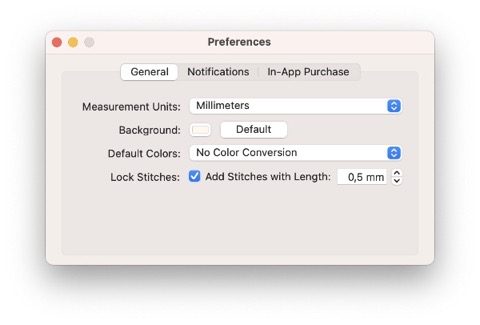
With StitchBuddy v3.2 some improvements were introduced, especially for working with shapes: Lock stitches can be added before and after jumps to avoid dissolving designs, and the stitch order of a selection can be reverted.
Read more...Filling shapes improved
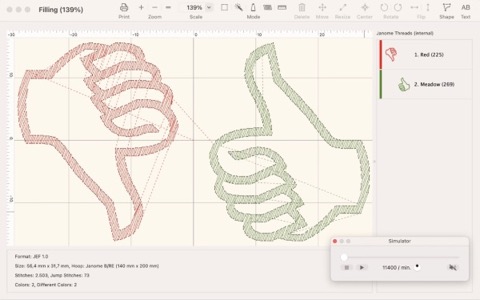
The last days I have massively improved the order in which shapes are filled: StitchBuddy had issues with objects stacked in stitch direction.
Read more...Adding text and importing SVG files
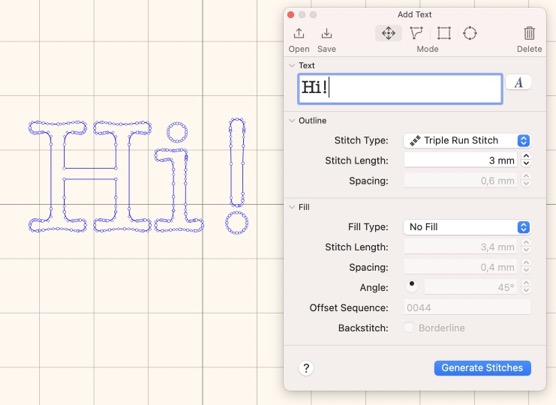
StitchBuddy 3.1.0 is introducing the next level of adding shapes to your designs: Now you can add shapes by typing text with all fonts installed in macOS. In addition you can import SVG files and use their paths as shapes to be outlined or filled with stitches.
Read more...StitchBuddy loves Ventura
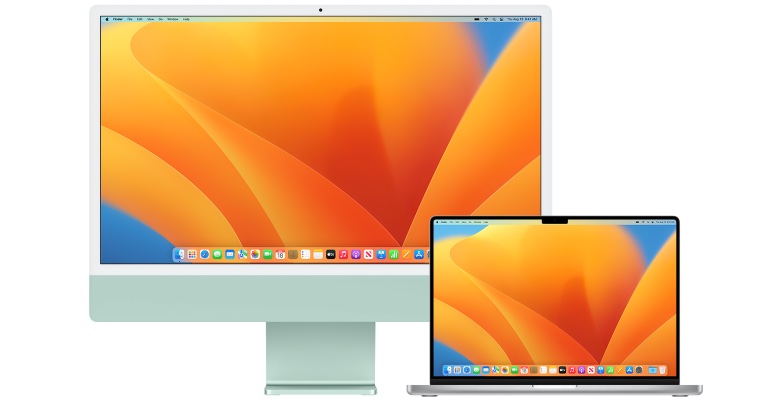
Apple has released macOS 13 "Ventura", and again StitchBuddy is ready for the most recent operating system for your Mac…
Read more...StitchBuddy 3.0 - more creative!
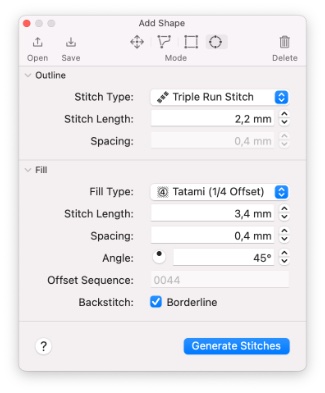
StitchBuddy v3.0 is introducing first digitizing capabilities! Add shapes as outlines or fills to your embroidery designs…
Read more...In-App purchases on macOS - fixed
The last days I released two bugfix versions of StitchBuddy for Mac: In-App purchases of StitchBuddy Pro were ignored if a customer had requested a refund for a former purchase and after that bought StitchBuddy Pro again. Honestly, I didn't test this constellation properly, but with the help of the affected customer - sending some extensive logging - I was able to identify and fix the issue with StitchBuddy v2.19.3.
Maybe this release was a quick shot because when reviewing related code I found that under rare conditions StitchBuddy Pro might not be considered as available in a customer's App Store - although it is. I'm confident this potential issue was fixed with StitchBuddy 2.19.4, although a final confirmation "from the field" is still missing.
My apologies to all users affected by those bugs … I appreciate your error reports and your patience and support during the analysis.
StitchBuddy 2.19 - Minor Changes
I just released StitchBuddy 2.19 for Mac - the update for iPadOS / iOS is still in Apple's review process. While I changed a lot internally, preparing for some exciting features to come, the visible changes are only minor ones:
- A new thread chart (Durak Poly-Soft) was added, which is an inexpensive Turkish brand, becoming popular in Europe
- StitchBuddy is retrieving news to be shown at app launch. This option can be disabled for specific news or in general. No personal data will be used for this service (refer to privacy policy)
Enjoy the update and I'd love to have your rating or even a review in Apple's App Stores.
Madeira Polyneon completed
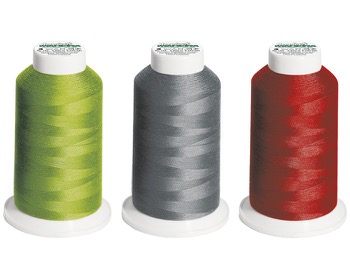
StitchBuddy v2.18.1 is proudly presenting the complete collection of Madeira Polyneon threads.
Read more...StitchBuddy 2.18 - Thread Files
StitchBuddy v2.18.0 is available for macOS and iOS. It is incorporating some minor improvements, e.g. a condensed title / toolbar and fixed Automator Actions with macOS 11 "Big Sur", and a thread list with flexible width.
But its major update is a new way to handle vendor thread charts.
Read more...Family Sharing

Apple's Annual Updates

Yes, it's autumn again, and - as every year - Apple has released major updates of macOS and iOS, introducing macOS 11 "Big Sur" and iOS 14.
Read more...Goodbye, file clutter [Updated]
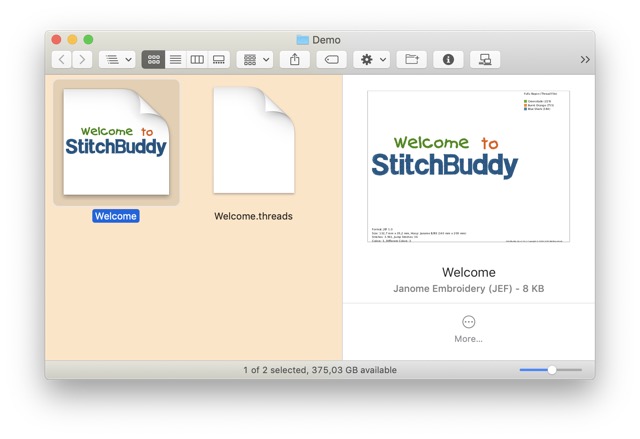
For almost a decade StitchBuddy is supporting different color palettes. An additional file is saved when you choose a vendor's thread chart, cluttering your embroidery folders. This time is going to end.
Read more...StitchBuddy 2.16
Maybe for the first time StitchBuddy's versions for macOS and iOS are synchronized: I just released StitchBuddy version 2.16.0 for both platforms. While the iOS version is only a small update, introduction the Brildor PB40 thread chart, on macOS some major improvements were introduced:
Read more...Desert-proof
StitchBuddy leaves Facebook

StitchBuddy's Facebook page will be deactivated due to Facebook's intransparency about compliance to European's General Data Protection Regulations (GDPR).
Read more...10th Anniversary

Happy Birthday, StitchBuddy!
At January 4th, 2008, I released the first version of StitchBuddy's predecessor.
Read more...StitchBuddy 2.14 ... Action!
Today a new version of StitchBuddy for Mac was released! The main enhancements of StitchBuddy 2.14 are Automator actions to convert designs, change thread palettes and print into PDF files. With these actions you can create workflows to handle multiple files completely automatically.
Only few people know about the possibilities of Automator, so I have created two dedicated video tutorials for this topic:
More information about additional changes can be found in the version history.
StitchBuddy for Mac will automatically update to version 2.14 depending on the App Store settings in your Mac's system preferences. This update preserves In-App purchases you might have made to unlock the trial's limitation.
Please leave a rating / review in Apple's Mac App Store or update your existing one if you want to support StitchBuddy's development.
Do you know "Automator"?

Sometimes users ask me for a batch conversion feature in StitchBuddy: They want to convert multiple embroidery files into other formats or graphics without the need to repeat the same operation manually for every single file. I'm currently working on a solution based on Apple's Automator: With this application every user will be able to easily define workflows with embroidery designs, e.g. exporting PDF files, combining them into a single document, or importing these files into Photos, or converting PES files into DST, or … The options are countless!
Automator workflows can be used as single applications or as "Services" e.g. to the context menu of files / folders. They can even be linked to folders and perform their actions automatically whenever a file is copied into these folders.
In my opinion Automator is a very powerful utility and definitely worthwhile to look into. But it seems only few macOS users know about it, so I will provide some video tutorials with examples with StitchBuddy actions once these are available.
How about you, do you know Automator? Feel free to comment on StitchBuddy's Facebook page…
macOS 10.13. "High Sierra"
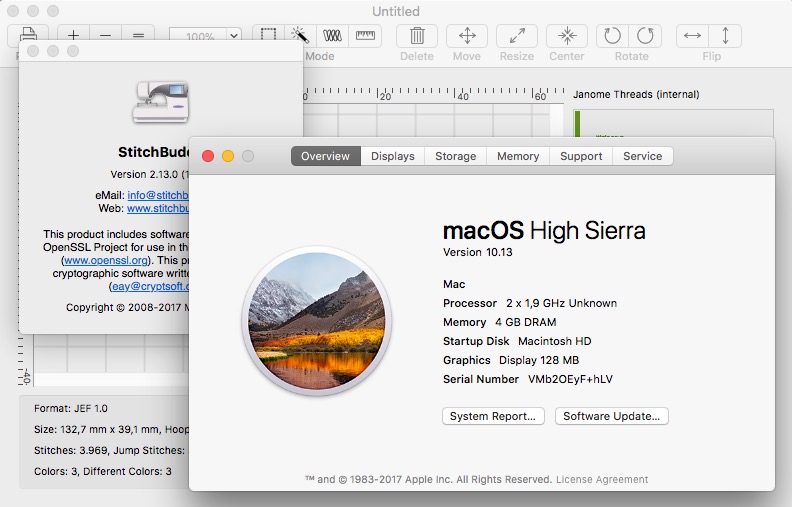
Yesterday Apple released the next version of macOS: I just installed macOS 10.13 "High Sierra" on my Mac (actually in a virtual machine) and StitchBuddy seems to work flawlessly after a short test.
StitchBuddy 2.13.0 (Mac)
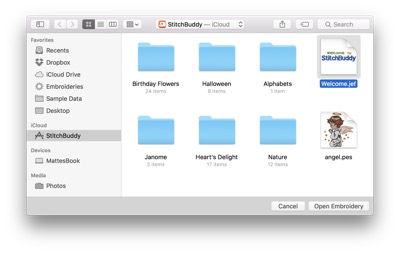
I just submitted StitchBuddy for Mac v2.13.0 for Apple's App Store approval. This free update will include some minor changes, e.g. an updated hoop menu and import support for PES v10 designs. But as a major enhancement StitchBuddy for Mac supports iCloud Drive.
Hello Mac App Store
And no worries for existing customers: In the past all StitchBuddy updates were provided for free, and this is not going to change: Install StitchBuddy's free version from the Mac App Store, and it will recognize your existing license code and unlock the Pro version with no additional charge. Please be aware that unfortunately I had to remove the function to delete hidden system files from USB sticks as it did not comply with store guidelines, and StitchBuddy requires OS X 10.9 or higher, now.

Ready for macOS 10.12 "Sierra"

Apple has just released the new operating system, macOS 10.12 "Sierra". Unfortunately I had to learn that it doesn't run on my MacBook Pro, which I used the last 7 years for StitchBuddy's development, and its replacement will have to wait some more months…
Today I borrowed my son's computer and was able to test StitchBuddy's compatibility with Sierra: After a quick check I can confirm that the current version of StitchBuddy works perfectly with macOS 10.12!
StitchBuddy 2.11 (Mac)
For several reasons I had to increase StitchBuddy's software requirement to OS X 10.7 ("Lion"): This version of OS X was introduced five years ago, and it became too complex to support older OS X versions anymore. Given Apple's free update policy for the last years I consider this decision a fair move.
To all MC500e users: Despite contradicting information I was receiving about the new hoops, I decided not to postpone this release any longer. Although I'm confident about the current implementation, please contact me by email if you face problems like unrecognized hoops in StitchBuddy or wrong hoop assignments. Make sure to include a sample file and the size / name of the involved hoop, and I will be able to incorporate a fix on short notice.
After some grace period the iOS apps StitchBuddy View and StitchBuddy HD will be updated in near future.
StitchBuddy 2.11 is a free update for all registered users of the Mac version, and can be downloaded from the corresponding Download page.
Please leave a comment at Facebook, and spread your opinion about StitchBuddy by word of mouth.
Toolbar Renovations

The effect is quite impressive, especially on high-resolution displays. What do you think…?
StitchBuddy 2.10.4 (Mac)
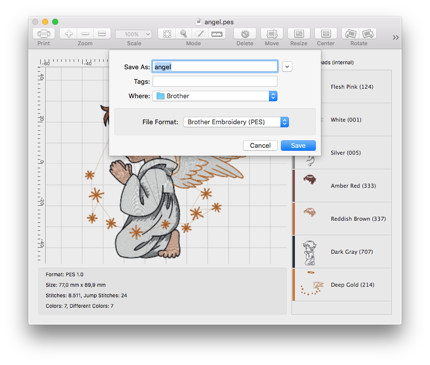
I just released StitchBuddy for Mac 2.10.4 as a minor bugfix release: As mentioned the "Save as…" dialog preselected the wrong file type when saving a design, which often resulted in a converted file (if the user confirmed the wrong selection). This issue is fixed. In addition I improved the recognition of writable file types, which sometimes prevents saving a design using the "Save" command although StitchBuddy could write the corresponding file type. Registered users can download the new release for free.
Edit: Please download again if you're facing problems with lost preferences / license codes in this version! I've provided an emergency fix.
"Save as..." with wrong file type
Today I investigated further and - at least - could identify the problem:
I found out that until StitchBuddy 2.9.1 the „Save as...“ dialog preselected the current file extension (e.g. PES) when prompting for a new file name, while since StitchBuddy v2.9.3 its default is the first file format of the list, which is JEF. This happens without any related code changes in StitchBuddy, so it seems Apple has changed some of their libraries in the meantime, and I wasn’t aware of this behavior. So StitchBuddy doesn't convert PES to JEF on its own, but preselects an incorrect file type in the "Save as..." dialog and - after the user's confirmation - converts the file.
Quite inconvenient and I will work on it! Until a solution you need to change the file type manually when using the „Save as…“ option.
Edit: Apple, that's not funny: After I rebuilt StitchBuddy with the current version of Apple's developer environment (Xcode), the problem disappeared ... so it seems they found and fixed it in the meantime. Good that I can provide you a fix within the next days, but bad as I wonder what they might have broken, now. I will perform some more tests before uploading a new StitchBuddy version for OS X.
OS X 10.11 "El Capitan"

For those of you who are waiting excitedly for Apple's release of OS X 10.11 aka "El Capitan" today: The current version of StitchBuddy for Mac is compatible with the new OS, including its plugins.
By the way: the same is true for StitchBuddy's iOS apps and iOS 9...
StitchBuddy v2.10.3
- Selection of background color (iOS)
- Background colors can be printed (optional)
- PDFs are created rasterized or vectorized (iOS)
- Stitch optimization improved
- VP3 import fixed (for old files with thread offsets)
- Context menus work with <Ctrl> + left mouse click (OS X)
StitchBuddy 2.10.3 is a free update for all registered users, and can be either downloaded from the corresponding Download page (OS X), or (after Apple's approval in a few days) updated in Apple's App Store (iOS).
Please leave a comment at Facebook, a rating / review in the App Store, and spread your opinion about StitchBuddy by word of mouth.
Have a wonderful July, 4th!
FAQ: Toolbar buttons stay gray
I assume that some more new users might struggle with the same problem, and decided to publish a new article in the FAQ section…
StitchBuddy 2.9.3
This version incorporates a canvas size based on the opened design, and the corrected VP3 import. The approval of StitchBuddy HD is still pending, but I expect it the next days including the mentioned changes and a basting function using not locking but overlaying stitches. The Mac version has just been released, too, and can be updated for free by registered users.
Have fun with this update, and if you like StitchBuddy I'd appreciate a rating or even a review in the iOS App Store.
Update: It took Apple nearly a week to approve StitchBuddy HD, but finally it's available since January 13th, 2015.
VP3 import fixed
I used this Christmas season to analyze the VP3 file structure more in detail, and finally I found the root cause and how to fix it. With the next release StitchBuddy will import these designs correctly:
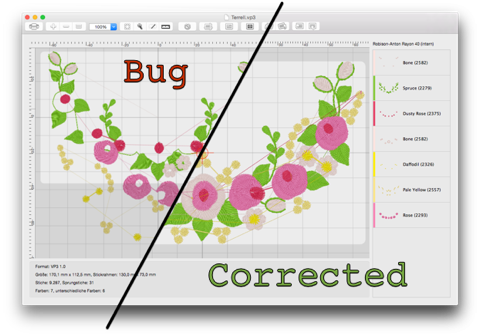
After incorporating some further minor changes and testing everything thoroughly, you can expect this update somewhere in January.
Bugfix release 2.9.1
In parallel I submitted new versions of StitchBuddy HD / View for Apple's App Store, with native support of the new iPhone 6 / 6 Plus screen sizes, and a fix of Dropbox syncing in combination with case-sensitive file names. I expect them to be approved in about one week.
Update (2014/10/11): I just decided to withdraw both iOS versions and resubmitted v2.9.2 today: the "zoom-to-fit" (by two-finger double-tap) didn't honor device orientations, and I just fixed it. Now the design will always zoomed to the maximum size while remaining fully visible.
StitchBuddy 2.9
More details can be found in the version history on StitchBuddy's website.
StitchBuddy 2.9 is a free update for all registered users, and can be either downloaded from the corresponding Download page (OS X), or updated in Apple's App Store (iOS).
Please leave a comment at Facebook, and spread your opinion about StitchBuddy by word of mouth.
StitchBuddy 2.8 for OS X
- The color list includes previews for each thread's usage
- The stitch-order of threads can be changed
- Threads can be split or combined, especially useful for monograms
- The canvas size is fixed, so the display remains constant while resizing / moving stitches
- Selections can be converted between regular and jump stitches
- The scroll performance was enhanced
StitchBuddy 2.8 is a free update for all registered users of the Mac version, and can be downloaded from the corresponding Download page.
Please leave a comment at Facebook, and spread your opinion about StitchBuddy by word of mouth.
Create embroideries with Inkscape
Version 2.7 renews all products
- Gallery with subfolder support (iOS)
- Designs can be opened in other apps (iOS)
- X-ray view shows underlays when selecting stitches
- Madeira Rayon thread colors added
- Support of JEF+ file format (read-only)
- Support of Janome MC 9900 (new hoops)
Are you already using subfolders in StitchBuddy's application folder on Dropbox, e.g. as an archive of designs? Please move these subfolders out of StitchBuddy's Dropbox folder before updating the iOS versions.
Please share your opinion at Facebook, and support StitchBuddy by leaving a rating / review in the App Store.
StitchBuddy 2.5.3 released
New releases of the iOS apps were sent for Apple's review in parallel, incorporating Facebook / Twitter integration and minor bug fixes.
New versions ahead
The bug fix still needs some thorough testing, but I expect minor updates of all (!) StitchBuddy products in the next weeks. The new version will also include a fix to support OS X 10.9 "Maverick", and Facebook / Twitter support for iOS ... and the mentioned limitation to iOS 6.0 (and above).
Surfing the first wave

The WWDC keynote made me curious enough to download and install very first versions of both operating systems, previews only available to registered developers: Although I was able to identify minor issues with StitchBuddy's Quick Look plugin and the stitch simulator on OS X 10.9, these might be caused by the very early state of Apple's preview. I will check again at a later more stable state, and I am confident to resolve any possible problem. iOS 7 is currently only available for the iPhone, so I checked StitchBuddy View, and found it working, yet with an unfamiliar appearance.
This was only a very first glance, both OS are still subjects to change in the next months, but it was fun surfing the first wave and finding my apps working well…
Update (2013/07/12): Apple has fixed the mentioned Quick Look issue with Mavericks 3rd Developer Preview (I filed a bug report), and I figured out how to fix the Stitch Simulator. I'll incorporate this minor change in the next update, and everything will be fine for the next OS X version.
Gaps and Jumps
This bug existed since the early days, but now it is corrected, and I just released StitchBuddy v2.5.1. While Mac users can immediately download from the web site, the iOS versions of StitchBuddy View and -HD will take some more days until they are approved by Apple.
Update (2013/03/06): StitchBuddy HD 2.5.1 was approved today.
Mac OS X 10.5.x crash corrected
Fortunately a fix was easy to apply, and StitchBuddy 2.4.6 is ready for download.
Black Friday Sale: 70% off

For one week, from November 23rd to 30th, 2012, both StitchBuddy products are offered with a 70% discount: Get StitchBuddy for your Mac (USD 14.99), or for your iPad (USD 8.99), and enjoy your embroideries like never before.
Be sure to place your order in the mentioned timeframe to entitle to this rebate.
JPX / WonderFil support added
Unfortunately the support for JPX files is not as smooth as I wanted it to be: As a matter of fact the file extension ".jpx" is already reserved by another file type: JPEG 2000, a graphic file, so Janome made a bad decision using the same extension for their embroidery designs. Implications for StitchBuddy can be found on the related support pages (Mac, iOS).
Feel free to download the new version for your Mac here, or use the App Store update function on your iPad.
How to use Janome JPX Files
More Thread Charts
Update StitchBuddy for free on both, your Mac and your iPad... either in the App Store or from the download page.
Watch the Mountain Lion!
I just uploaded a very, very, very minor release of the OS X app and its plugins: StitchBuddy v2.4.3 is now completely code-signed to comply with Gatekeeper of OS X 10.8 "Mountain Lion". In addition I tested all functions of StitchBuddy and the Quick Look / Spotlight plugins with the upcoming operating system, and everything is working flawless.
Minor bugfixes

Additionally I made some changes to improve the performance on the new iPad's Retina display. Here's a list of all changes:
- Leading / trailing jump stitches are not included into selections
- Performance improvements for Retina displays.
- Enhanced PES support (additional color codes).
- Fixed: Corrupted grid at some zoom levels on Retina displays.
- Fixed: Crashes caused by unknown thread colors.
Some bugfixes
- StitchBuddy crashed on Mac OS X 10.5.x when opening any design. This was caused by using an internal function available since Mac OS X 10.6 (aka "Snow Leopard"), only.
- By eliminating the title bar of the delay screen, it was impossible to enter a license code.
- When the "Stitch Simulator" was closed after forwarding, but without running the simulation, the display showed an unfinished design.
Simulator, Full-Screen, Resume
- Full-Screen allows you to edit embroideries without any disturbance from the dock or the menu bar, fully integrated with Mission Control
- Resume (aka "Windows Restoration"), prevents the status of open windows incl. zoom level, scroll position, selections / selection mode even if you close and relaunch StitchBuddy
An additional new feature for all users is the Stitch Simulator: This "Virtual Embroidery Machine" gives you a perfect impression how a design will stitch out in reality: The stitching process is drawn step by step, showing underlays, jumps, the color sequence, and all details. You can abort or pause a stitch out, adjust its speed, and jump to any position. StitchBuddy stays completely operational, so you can change zoom levels, view options, even select stitches during the animation. This function is extremely helpful to examine designs before stitching, and just for the fun of it I've added an appropriate sound effect (actually it's my wife's Janome MC350E).
StitchBuddy v2.3 is a free update for all registered users. New users are encouraged to download and test the full-featured trial version before purchasing a permanent license for USD 49.95 / EUR 39.95.
Coexistence with others
It turned out these customers were using other Mac embroidery software in parallel, and this software assigned file types to embroidery designs, StitchBuddy didn't know. For some reason this issue wasn't effecting all users of such a software combination, but only a minority; I wasn't able to reproduce it myself.
Fortunately this behaviour could be fixed by a small configuration change in StitchBuddy. Therefore a minor release v2.2.3 is available for download, and is still compatible with the PowerPC architecture (despite my former posting). But this version is expected to be the last one…
Bye bye, PowerPC...
After long considerations I decided to move forward, and StitchBuddy v.2.2.2 is the last "Universal" application, supporting both, the Intel and PPC architecture: Future versions with additional features will require an Intel processor, but StitchBuddy v2.2.2 will remain available for download.
So you might have noticed: StitchBuddy's summer break has ended, and I'm eager to implement some cool new things, finally with Lion and a new development environment ("Xcode 4").
Janome Memory Craft 12000
StitchBuddy v2.2.2 is able to write JEF embroidery designs up to the size of 230 x 300 mm, and its USB export function supports the MC 12000 as well. Look at the version history for some details.
And again: This update is a free download for all registered users, and can be evaluated by others with all features before purchasing a license.
Lion fully supported
Additional I fixed some minor bugs unrelated to Lion, more details can be found in the version history. Unfortunately one of them prevents the update check of StitchBuddy to notify about this minor release...
StitchBuddy v2.2.1 is a free download for all registered users, and can be evaluated by others with all features before purchasing a license
Roar!

There's one small issue when viewing embroidery files with the Quick Look plugin: As Lion uses a white background, the white text (thread names, etc.) is unreadable. I will fix this problem with a minor release the next days.
Another problem unrelated to Lion was reported by a user, and will be fixed as well: StitchBuddy crashes after entering too small or too large zoom factors manually. Thanks, Gregor!
StitchBuddy 2.2 writes PES files
- write support of Brother / Baby Lock / Bernina PES v1.0 designs
- read and write support of Brother PEC designs
- three new thread charts: Ackermann Isacord, Floriani Polyester, Fufu Rayon
- some minor bug fixes and enhancements (look at the versions history for more details)
StitchBuddy v2.2 is a free update for all registered users. New users are encouraged to download and test the full-featured trial version before purchasing a permanent license for USD 49.95 / EUR 39.95.
3D View enhanced, bugs fixed
Together with this bug fix StitchBuddy v2.1.2 includes some minor enhancements, my favorite is the improved 3D view I mentioned earlier:
- 3D effects improved (using gradients): Much better visualization at higher zoom levels
- Jump stitches are ignored when marking the first stitch; until now it was always at (0, 0)
- JEF export corrected: Files were corrupted if a color change happened to be a jump stitch (rare situation with Janome Digitizer 3.0N)
- Alignment of PES files corrected: Offsets to the design's origin were ignored
- Export function supports devices with a smaller capacity (max. 16 MB), formatted with MS-DOS (FAT12)
As you might have guessed StitchBuddy v2.1.2 is a free update for all registered users, and can be purchased for USD 49.95 / EUR 39.95.
Version 2.1.1 fixes PES bug
Changing a single line of code fixed this bug, and as no user seemed to be effected by the error for two years, I decided to incorporate it with upcoming enhancements into the next release.
Yesterday a user reported this issue, so I changed my mind and released StitchBuddy v2.1.1 today, which also includes some minor corrections (details can be found in the version history).
Eye Candy
I faked a 3D display by drawing a black outline around each stitch, and an additional white one in its center: Good enough for overviews, but pretty rough at higher zoom levels. The last days I evaluated several other methods, looking for a faster display performance and a better look, and I succeeded. Here's a comparison between the current and the new approach:

With the next release StitchBuddy will use gradients to simulate 3D stitches, and as you can see the effect is quite impressive, with even a (slightly) faster performance.
StitchBuddy 2.1 released
Feel free to download version 2.1 of the application and both plugins including the following new features:
- Support for different measurement units (millimeters, inches with decimals, inches with fractions)
- Auto conversion of thread charts
- Selected stitches can be moved by Drag'n'Drop
- New function "Measure" to measure a distance in a design
- Designs can be copied as images or text by Drag'n'Drop, even to Mac OS X Finder (creating JPEG files)
Starting today StitchBuddy and both plugins will share the same version number: As all modules are based on the same core functions, any modification will lead to new releases anyway. The same version number will avoid unnecessary confusions.
StitchBuddy v2.1 is a free update for all registered users and can be purchased for USD 49.95 / EUR 39.95.
Support of more PES formats
StitchBuddy v2.0.2 is a free update for registered users and as always StitchBuddy-QL / -MD v1.4.2 can be downloaded for free.
"Open" dialog confuses users
The solution is quite simple: StitchBuddy is already running, so just navigate to any supported embroidery file and open it.
Because some users faced the same confusion, I decided to add a related answer to this "Frequently Asked Question", which might help others facing the same situation.
StitchBuddy reviewed by Jim Stutsman
These days Jim wrote a review in his blog "Online Sewing" and I'm really proud about his conclusion: "If you only work with purchased designs, then StitchBuddy is all you need for the Mac. It's the single best tool I've ever found for working with Janome embroidery designs, and that includes all of the ones available for the PC". Thank you, Jim!
More hoops and "any color"
- Now owners of Janome's MB-4 can select the standard hoop M1 (I just missed it for some reason) and the new AcuFil Square Quilting Hoop (ASQ) was added.
- JEF designs with the "any color" thread code (like some of Janome's quilting designs) are supported.
- Some minor adjustments were made to improve the usability when switching between color modifications and selection modes.
StitchBuddy 2.0
After four months of serious coding and one year after its first release, a major update of StitchBuddy is released. I won’t summarize all changes in this blog entry (some more details can be found in the version history), but now StitchBuddy has become a full-featured embroidery editor: You can select parts of a design and move, resize, rotate, flip and delete them. All modifications can be undone, real-size templates can be printed and a lot more functions were added. Just look at the feature page for more information. StitchBuddy-QL and StitchBuddy-MD were updated to support new thread charts and hoops.
To reflect these major changes this web site was completely redesigned, featuring a blog, some YouTube videos and a detailed FAQ section to answer all product-related questions.
StitchBuddy v2.0 is a free update for all registered users and can be purchased for USD 49.95 / EUR 39.95.
Snow Leopard bug fix
More Pfaff formats
Thread charts and VP3
Both plugins are updated as well to support the new thread colors and VP3 embroideries.
Stand-alone application StitchBuddy
Its main purpose is to preview changes of a design’s thread colors, but I added some more features: Designs can be flipped and rotated by 45° and it’s possible to center a design in its hoop. Based on the StitchBuddy framework the application can read JEF, PES, SEW, EXP, and DST embroidery files. Unfortunately I didn’t find enough information to write PES, so saving designs is limited to JEF, EXP, and DST.
StitchBuddy can be purchased for USD 25 / EUR 20.